
What can you do with Blue Star and Niko Home Control?
Manage multi-zone heating and cooling with your air conditioning
If you connect your air conditioning to Niko Home Control, you can control them via push buttons, the Niko Home app on a tablet or smartphone, the Touchscreen and/or Digital black.
You can control multiple rooms individually, using the following actions:
-
Start/stop
-
Check and set the room temperature
-
Choose speed: low, medium, high
-
Choose programs and modes
We recommend the following options to make even better use of this connection:
-
Optimise air conditioning settings based on the availability of excess solar energy; see Creating a condition.
-
Automate air conditioning; see Custom routine.
What do you need?
Niko requirements
Ihre Niko Home Control-Installation erfüllt die folgenden Anforderungen:
-
Es hat einen connected Controller II.
-
Es wurde mit der neuesten Programmiersoftware konfiguriert.
Sie benötigen das/die folgenden zusätzliche(n) Niko-Produkt(e):
-
Optional ein Digital black, um das HLK-System über ein an der Wand montiertes Display zu steuern.
Trane requirements
Ihr System erfüllt die folgenden Anforderungen:
-
Es handelt sich um ein VRV- oder VRF-Klimasystem.
-
Das gesamte HLK-System stammt von derselben Marke.
Wiring diagram
Weitere Informationen und vollständige Installationsanweisungen finden Sie im Hardware-Handbuch der HLK-Schnittstelle (CoolMaster)
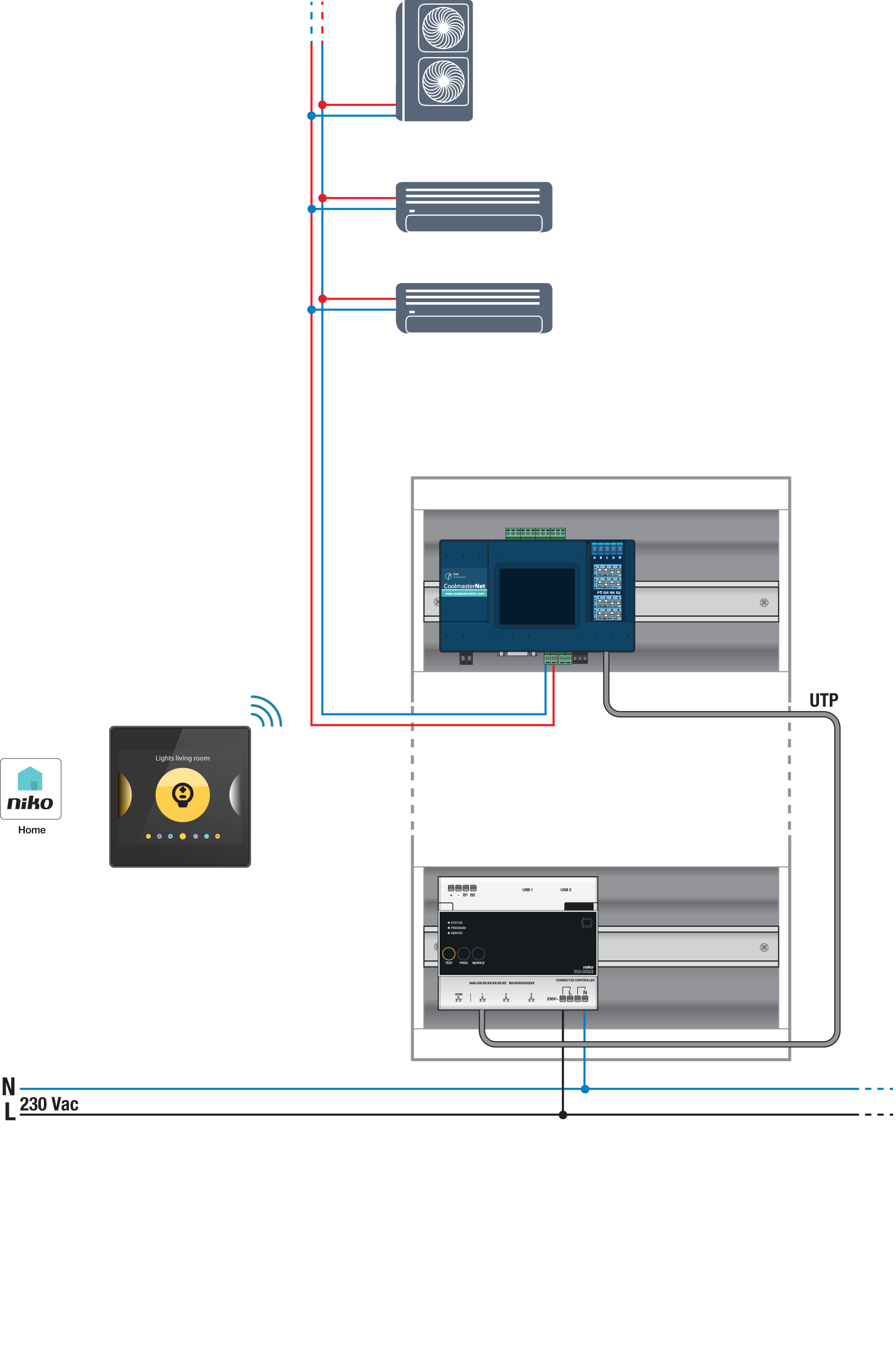
Bus connections on Blue Star indoor unit: A, B
Programming
Konfigurieren Sie den CoolMaster über die Niko Home Control Programmiersoftware. Erstellen Sie ein virtuelles HLK-Thermostat für jede Zone und verknüpfen Sie es mit dem/den Innengerät(en) unter Verwendung der Routine HLK pro Thermostat; siehe https://guide.niko.eu/en/smnhc2/lv/hvac-per-thermostat.
Nach dem Hochladen der neuen Konfiguration erscheinen die virtuellen HLK-Thermostate in Ihrer Niko Home-App auf der Registerkarte Steuerung. Wenn Sie dieses Steuerelement bearbeiten, können Sie die Standardeinstellungen für verschiedene Programme und Modi leicht anpassen.