Niko Home Control is evolving into MOTIV Building Control. MOTIV is a new brand for intelligent building automation. Built on the trusted foundation of Niko Home Control, MOTIV solutions are designed to make buildings work more naturally for the people inside them. MOTIV helps professionals create smarter, more comfortable buildings. With technology that works quietly in the background. All existing Niko Home Control solutions remain fully compatible with MOTIV. Over time, the full portfolio will move to the MOTIV brand. During this transition, you will see both Niko Home Control (NHC) and MOTIV Building Control (MBC) appear in this documentation. Discover MOTIV at niko.eu/MOTIV
Hardware manual Niko Original, Niko Intense, Niko Pure, Niko Rocker and Niko Toggle
English Danish Dutch French German Slovak Swedish

Data connections

Installation instructions

Niko Original, Niko Intense and Niko Pure

Single flat RJ connection
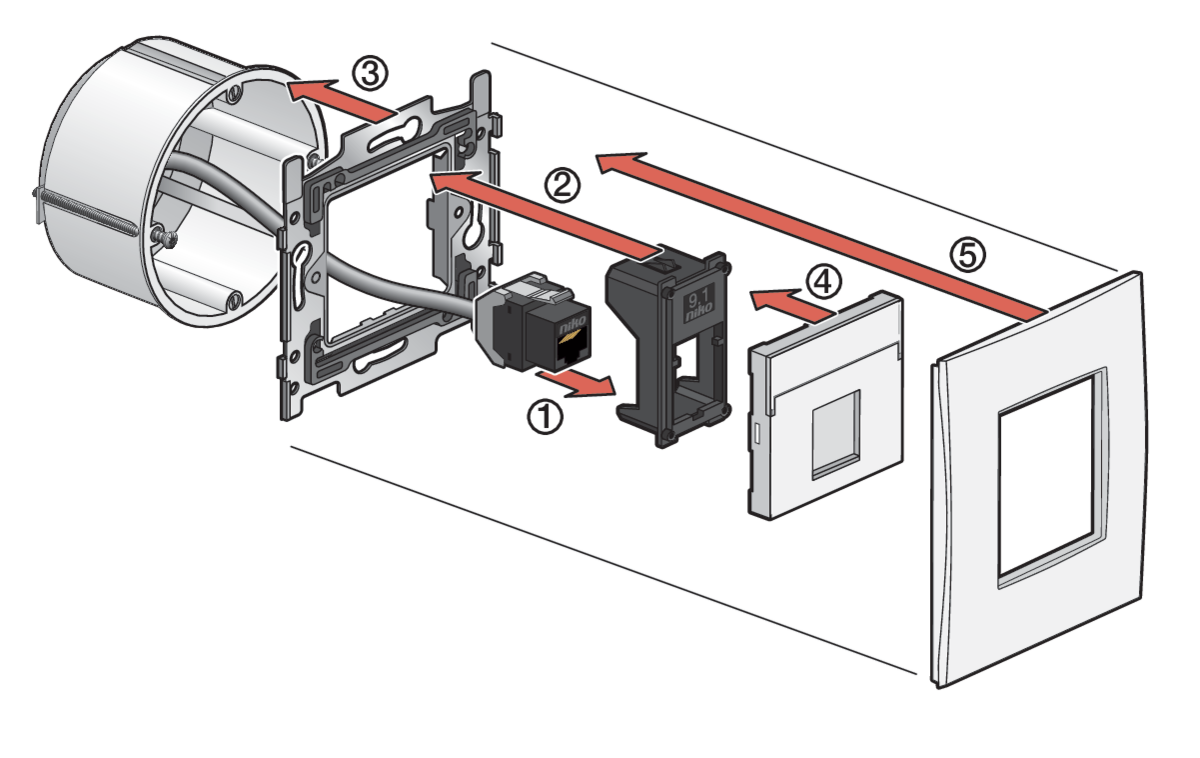
https://dam.nikocdn.eu/asset/167528/guideImage/170-65901_TG_002.png


Mounting steps
  1. Click the (already wired) connector into the adaptor.

  2. Click the adaptor into the centre of the base.

  3. Mount the base in the flush-mounting box.

  4. Click the central plate onto the base.

  5. Click the faceplate onto the base.

Check the article numbers for this combination on the Niko website.

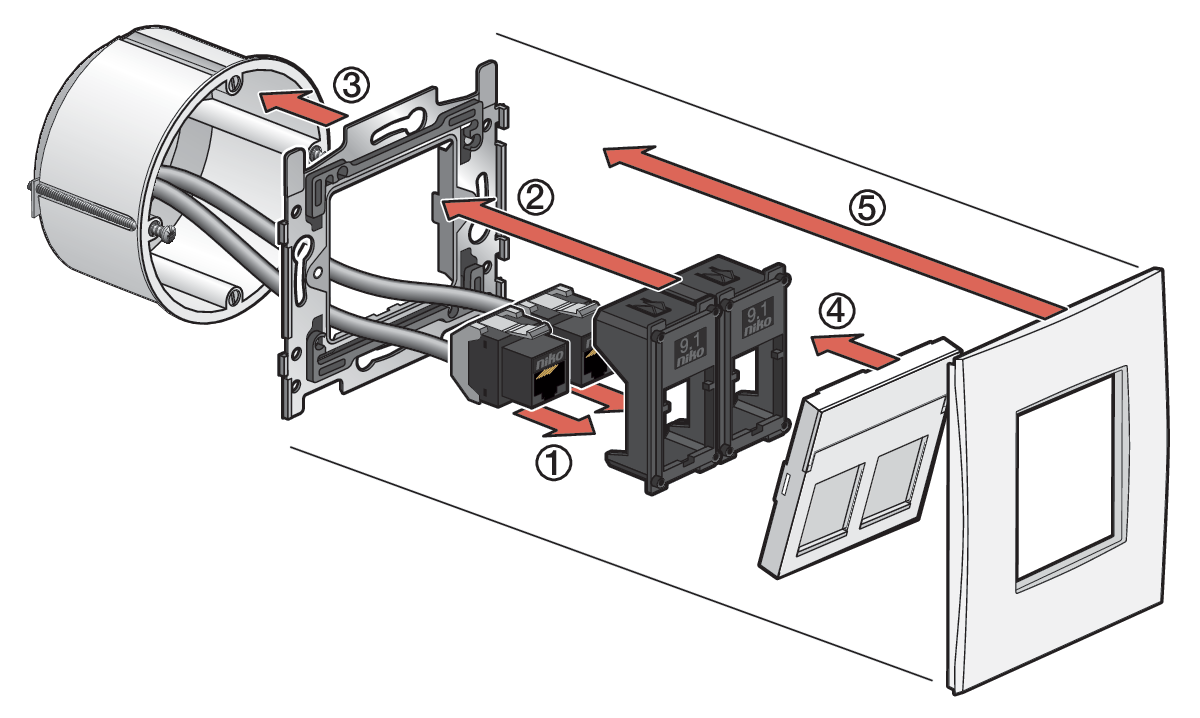
Double flat RJ connection

https://dam.nikocdn.eu/asset/167527/guideImage/170-65901_TG_001.png


Mounting steps
  1. Click each (already wired) connector into the adaptor.

  2. Click the two adaptors into the base.

  3. Mount the base in the flush-mounting box.

  4. Click the central plate onto the base.

  5. Click the faceplate onto the base.

Check the article numbers for this combination on the Niko website.

Double oblique RJ connection

https://dam.nikocdn.eu/asset/167530/guideImage/170-65904_TG_001.png


Mounting steps
  1. Click each (already wired) connector into the adaptor
    Attention: the connector needs to be mounted with the Niko logo upside down

  2. Click the adaptor into the base.

  3. Mount the base in the flush-mounting box.

  4. Click the central plate onto the base.

  5. Click the faceplate onto the base.

Check the article numbers for this combination on the Niko website.

Niko Rocker and Niko Toggle

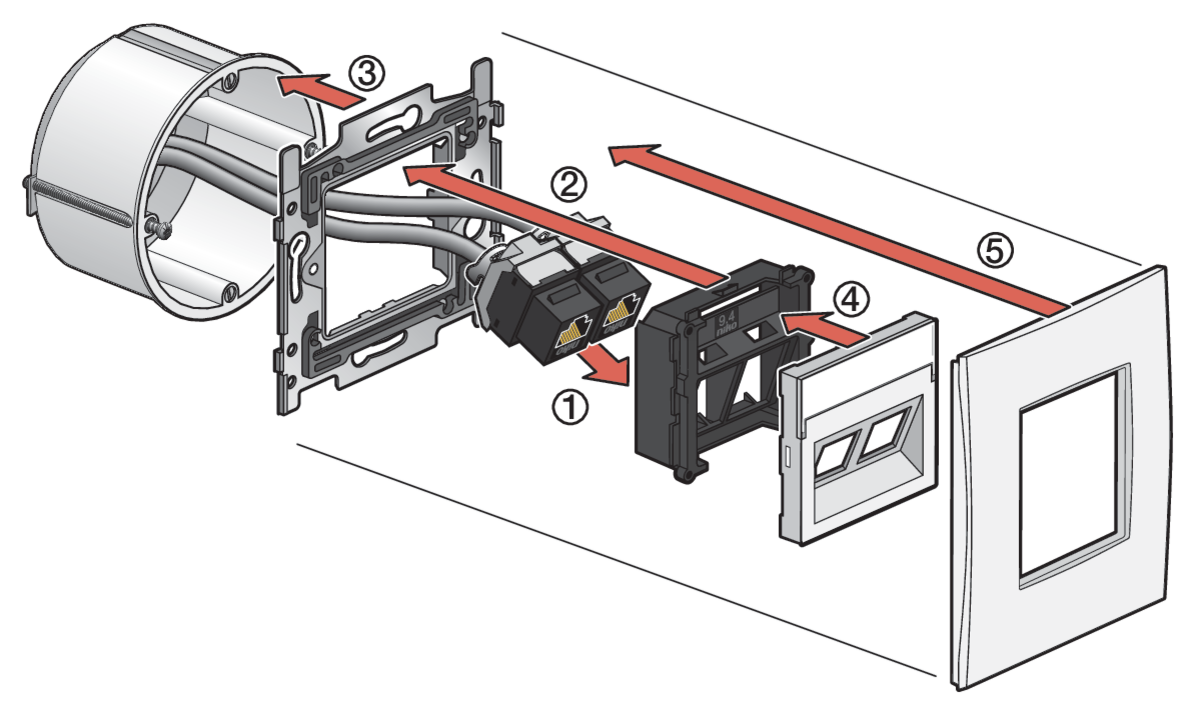
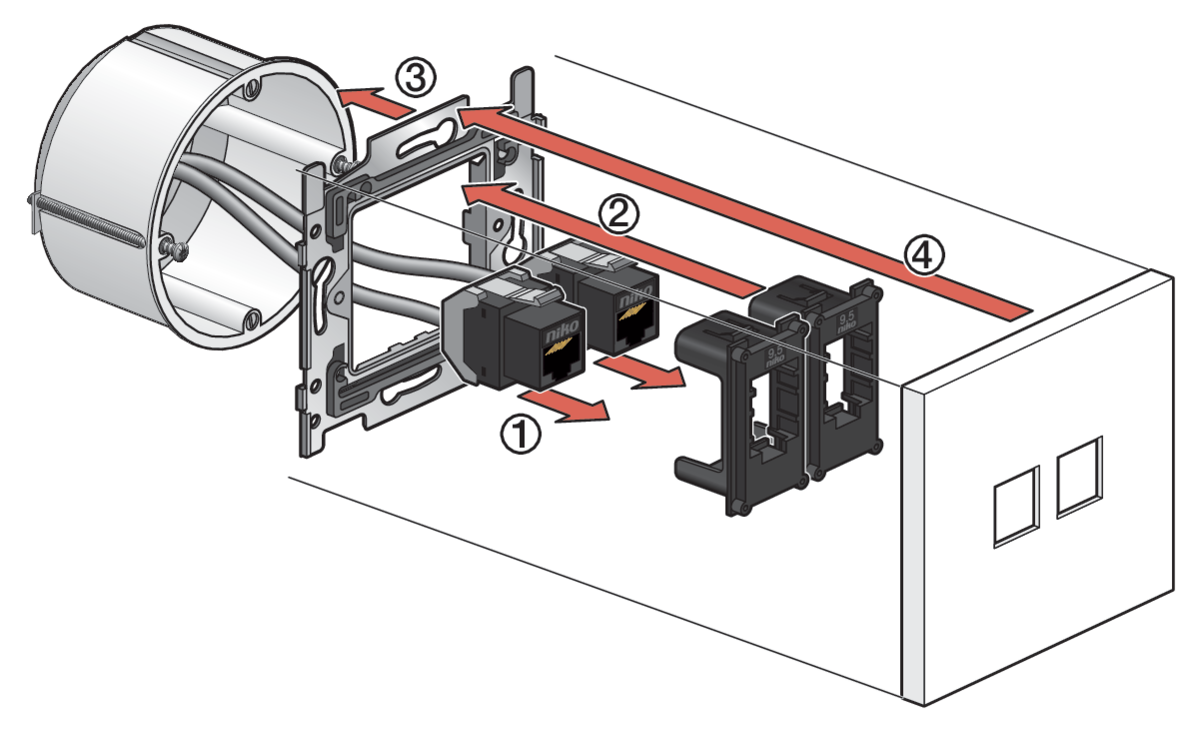
Double RJ connection – UTP
https://dam.nikocdn.eu/asset/167529/guideImage/170-65905_TG_001.png


Mounting steps
  1. Click each (already wired) connector into the adaptor.

  2. Click the two adaptors into the base.

  3. Mount the base in the flush-mounting box.

  4. Click the faceplate onto the base.

Check the article numbers for this combination on the Niko website.

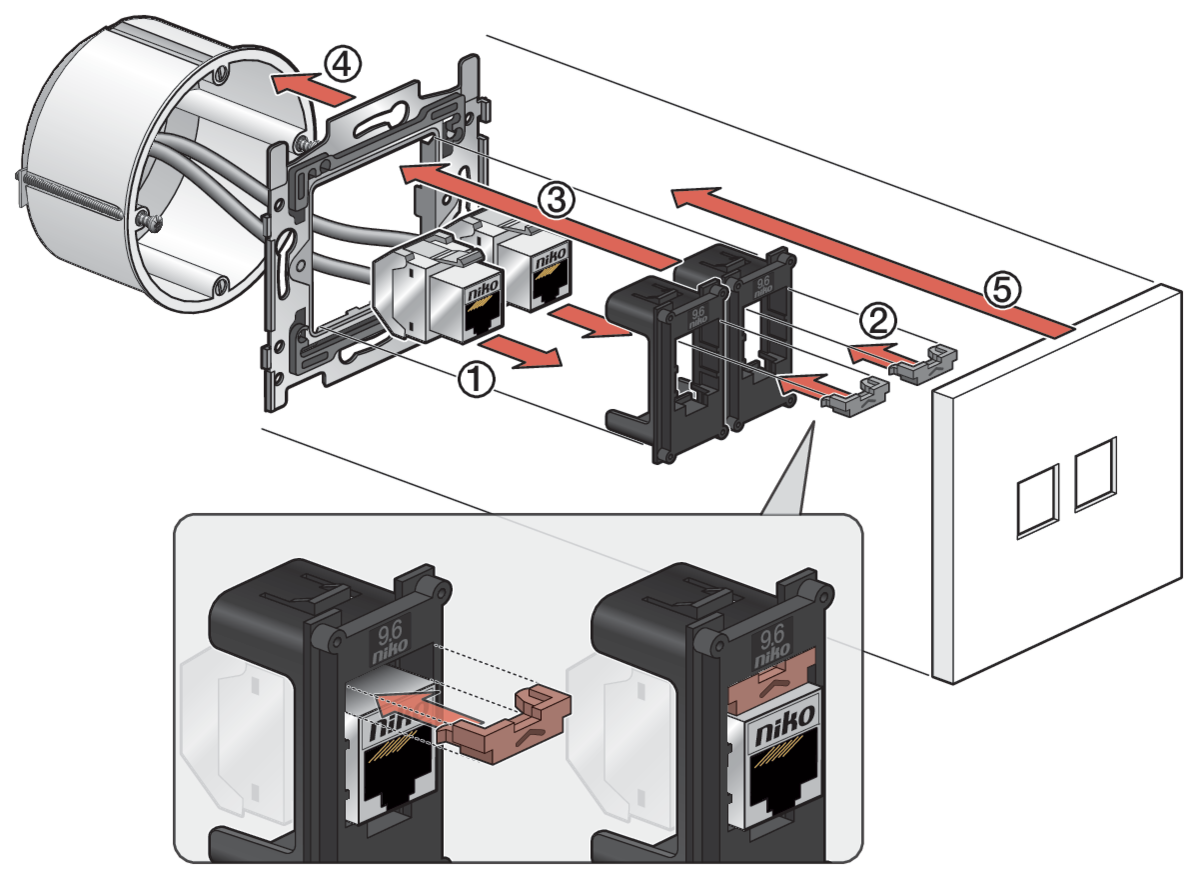
Double RJ connection – STP

https://dam.nikocdn.eu/asset/167531/guideImage/170-65906_TG_001.png


Mounting steps
  1. Click each (already wired) connector into the adaptor.

  2. Click the inserts into the adaptors, on top of the installed connectors (the insert is included in the packaging of the adaptor).

  3. Click the two adaptors into the base.

  4. Mount the base in the flush-mounting box.

  5. Click the faceplate onto the base.

Check the article numbers for this combination on the Niko website.


nv Niko sa
Industriepark West 40
9100 Sint-Niklaas, Belgium

http://www.niko.eu

+32 3 778 90 80
support@niko.eu

The installation of products that will permanently be part of the electrical installation and which include dangerous voltages, should be carried out by a qualified installer and in accordance with the applicable regulations. This user manual must be presented to the user. It should be included in the electrical installation file and it should be passed on to any new owners. Additional copies are available on the Niko website or via Niko customer services.
image-20250212-095720.png

This product complies with all of the relevant European guidelines and regulations. For radio equipment Niko llc declares that the radio equipment in this manual conforms with the 2014/53/EU directive. The full text of the EU declaration of conformity is available at https://www.niko.eu under the product reference, if applicable.

image-20250212-095650.png

This product and/or the batteries provided cannot be disposed of in non-recyclable waste. Take your discarded product to a recognised collection point. Just like producers and importers, you too play an important role in the promotion of sorting, recycling and reuse of discarded electrical and electronic equipment. To finance the rubbish collection and waste treatment, the government levies recycling charges in certain cases (included in the price of this product).
image-20250212-100336.png