
What can you do with Chigo and Niko Home Control?
Manage multi-zone heating and cooling with your air conditioning
If you connect your air conditioning to Niko Home Control, you can control them via push buttons, the Niko Home app on a tablet or smartphone, the Touchscreen and/or Digital black.
You can control multiple rooms individually, using the following actions:
-
Start/stop
-
Check and set the room temperature
-
Choose speed: low, medium, high
-
Choose programs and modes
We recommend the following options to make even better use of this connection:
-
Optimise air conditioning settings based on the availability of excess solar energy; see Creating a condition.
-
Automate air conditioning; see Custom routine.
What do you need?
Niko requirements
Votre installation Niko Home Control répond aux conditions suivantes :
-
Il dispose d'une unité de contrôle connectée II.
-
Il est configuré avec le logiciel de programmation le plus récent.
Vous avez besoin du/des produit(s) Niko supplémentaire(s) suivant(s) :
-
En option, un Digital black pour commander le système HVAC via un écran mural
Trane requirements
Votre système répond aux conditions suivantes :
-
Il s'agit d'un système HVAC VRV ou VRF.
-
L'ensemble du système HVAC est de la même marque.
Wiring diagram
Pour plus d'informations et des instructions d'installation complètes, consultez le manuel matériel de l'interface HVAC (CoolMaster)
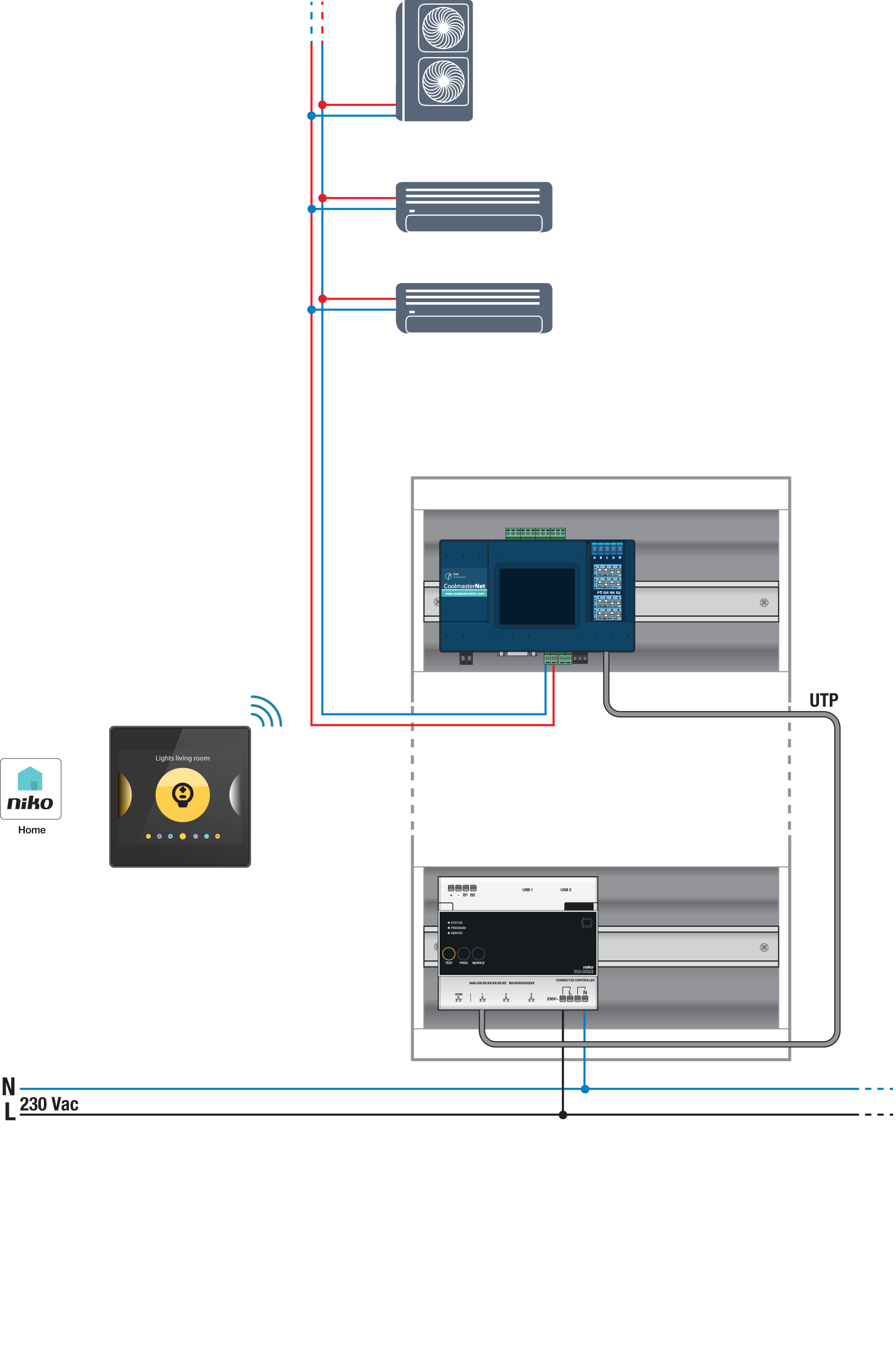
Bus connections on Chigo indoor unit: X, Y, E
Programming
Configurez le CoolMaster via le logiciel de programmation Niko Home Control. Créez un thermostat HVAC virtuel pour chaque zone et reliez-le à l'unité intérieure à l'aide de la routine HVAC par thermostat. https://guide.niko.eu/fr/smnhc2/lv/hvac-per-thermostat?l=fr.
Après avoir téléchargé la nouvelle configuration, le(s) thermostat(s) HVAC virtuel(s) apparaîtra(ont) dans votre application Niko Home dans l'onglet Commande. En modifiant cette commande, vous pouvez facilement ajuster les paramètres par défaut pour divers programmes et modes.