
What can you do with Blue Star and Niko Home Control?
Manage multi-zone heating and cooling with your air conditioning
If you connect your air conditioning to Niko Home Control, you can control them via push buttons, the Niko Home app on a tablet or smartphone, the Touchscreen and/or Digital black.
You can control multiple rooms individually, using the following actions:
-
Start/stop
-
Check and set the room temperature
-
Choose speed: low, medium, high
-
Choose programs and modes
We recommend the following options to make even better use of this connection:
-
Optimise air conditioning settings based on the availability of excess solar energy; see Creating a condition.
-
Automate air conditioning; see Custom routine.
What do you need?
Niko requirements
Vaša inštalácia Niko Home Control musí spĺňať nasledujúce požiadavky:
-
Musí obsahovať modul connected controller II.
-
Musí byť nakonfigurovaná pomocou najnovšej verzie programovacieho softvéru.
Budete potrebovať nasledujúce dodatočné produkty od spoločnosti Niko:
-
Voliteľne aj jednotku Digital black na ovládanie HVAC systému prostredníctvom nástenného displeja.
Trane requirements
Váš systém musí spĺňať nasledujúce požiadavky:
-
Je to HVAC systém typu VRV alebo VRF.
-
Kompletný systém HVAC je od tej istej značky.
Wiring diagram
Ďalšie informácie a kompletný návod na inštaláciu nájdete v návode k hardvéru HVAC rozhrania (CoolMaster)
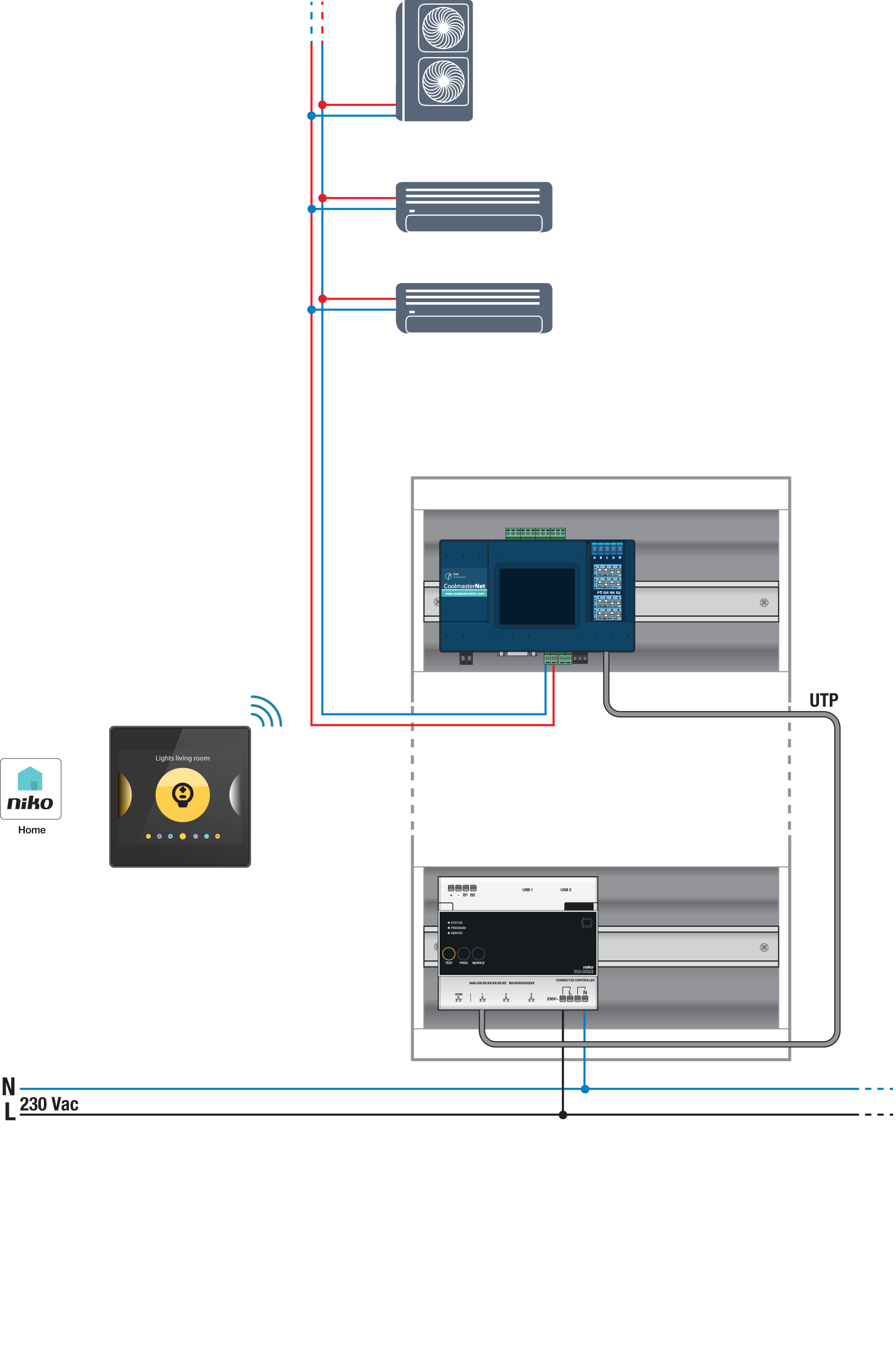
Bus connections on Blue Star indoor unit: A, B
Programming
Nakonfigurujte jednotku CoolMaster pomocou programovacieho softvéru Niko Home Control. Vytvorte virtuálny HVAC termostat pre každú zónu a prepojte ho s vnútornými jednotkami pomocou režimu HVAC pre každý termostat; pozrite si https://guide.niko.eu/en/smnhc2/lv/hvac-per-thermostat.
Po nahratí novej konfigurácie sa virtuálne termostaty zobrazia vo vašej aplikácii Niko Home na karte s ovládačmi. Upravením tohto ovládača jednoducho upraviť aj predvolené nastavenia pre rôzne programy a režimy.