
Description
A mesh network allows connected devices to communicate with each other and relay signals across the network, extending range and improving reliability without requiring every device to connect directly to a central controller. The wireless smart hub (552-00001/2) is the mesh controller or master node and starts the communication within the network. In a mesh network, communication is repeated by powered nodes.
The connected socket outlet or other third-party repeaters connected to the mains or power supply act as repeating nodes in a mesh network.
Battery-powered or energy-harvesting devices like a wireless motion detector do not act as repeating nodes in a mesh network. They only act as receiver nodes and cannot be used to extend the network.

|
Node color |
Device |
Examples |
|---|---|---|
|
red node |
master node |
wireless smart hub |
|
green node |
repeating node |
|
|
beige |
receiver node |
wireless motion detector |
Supported products
Wireless devices, compatible with our system, using the RF technology Easywave and Easywave#, are point-to-point solutions and do not have mesh capabilities. Those wireless devices are connected in another way to the installation and are therefore treated differently. A list of these products can be found here: https://products.niko.eu/nl-be/article/niko-home-control?classification%5B42%5D%5B%5D=communicationprotocolwireless_easywave&page=1
Wireless devices, compatible with our system, using Zigbee® RF communication technology or referring to the “Niko Home Control wireless network” or MOTIV wireless network, do have the wireless mesh capabilities and follow the principles as described below.
Security standard
During the installation of a mesh network device in your Niko Home Control installation, the device sends its encryption key to the wireless smart hub, which, in turn, sends the security key to the connecting device to pair the two of them and establish a secure data connection. At this moment the Niko Home Control network setup uses an automatic exchange of the encryption key from the new device to the wireless smart hub.
On the front of all Niko Home Control mesh devices, you can find an install code. You don't need this install code to add the device to your Niko Home Control installation.


Extending a mesh network
General
To extend your network install the repeating nodes within a max. of 10 m (indoor) from each other. To make your network more redundant, install multiple repeating nodes within a 10 m distance from each other. When a repeating node fails, the mesh network re-routes the communication to other repeater nodes to reach the end of the network.
Adding a mesh device to a Niko Home Control installation
-
Install the wireless smart hub as follows:
-
Install the wireless hub at a central place with all the devices to be connected within range. Do this to avoid too many nodes to get to the furthest device.
-
Make sure the wireless smart hub is not surrounded by or close to metal parts (e.g. metal cabinet, shelf, metal construction, large metal home appliances...). These will interfere with the signal.
-
-
Install all the other devices according to the network principles described above.
-
Address the devices using the Niko Home Control programming software or the Niko Home app. Make sure that you address the devices in such an order that the next device to address is always closest to one of the already addressed and powered devices. Possible gaps in your network, as well as network redundancy (more fail-safe), can be solved by adding extra connected socket outlets or third-party repeaters at those locations.
|
setup 1 |
OR |
setup 2 |
|---|---|---|

|
|

|
As a general guideline, maintain a minimum distance of 2 m between the device and potential sources of radio frequency interference, such as network equipment (routers, access points, PCs, smartphones, etc.), Bluetooth® devices, DECT phones, baby monitors, wireless speakers, and other wireless communication systems. Also avoid installation near power converters, solar inverters, energy storage systems, electric motors, electronic LED transformers, microwave ovens, large bodies of water (e.g. aquariums), and substantial metal objects, as these may negatively affect wireless performance.
We recommend installing at least one 230V powered device on each floor to create a mesh network covering the entire building.
Signal strength
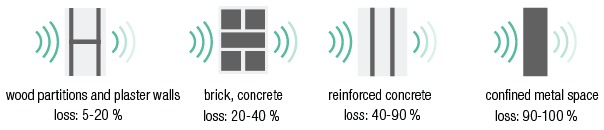
The operation of devices with a remote control, such as a TV or video and audio devices, is not disrupted by these devices. The indoor range is ± 10 m. In open spaces, the range reaches 30 m. The range of the device depends on the materials used in the residence.
Known limitations
|
Limitation |
Value |
|---|---|
|
Max. number of devices per installation |
50 |
|
Max. number of connected socket outlets per installation |
25 |
|
Max. distance between two devices |
10 m |
|
Max. transmission range |
10 m indoor |