
What can you do with Sommer and Niko Home Control?
Control your garage doors and gates
If you connect your motor-controlled garage doors and gates to Niko Home Control, you can control them via push buttons, the Niko Home app on a tablet or smartphone, the Touchscreen and/or Digital black.
You can perform the following actions:
-
Open/close
-
Stop opening/closing at an intermediate position
We recommend the following options to make even better use of this connection:
-
Receive an informative notification when the garage door or gate is open while you are away; see Creating notifications.
-
Automatically switch on lighting, when you open the garage door; see custom routine.
What do you need?
Niko requirements
Din Niko Home Control-installation uppfyller följande krav:
-
Den har en trådlös gateway eller en ansluten kontrollenhet II
-
Den är konfigurerad med den senaste programmeringsprogramvaran.
Beroende på vilka grundläggande moduler din Niko Home Control-installation har behöver du installera följande extraprodukter:
|
|
Nödvändiga extraprodukter |
Referensnummer |
|---|---|---|
|
Ansluten kontrollenhet |
Kopplingsaktor med en ledig utgång per signal som du vill använda i Niko Home Control Om ingångskontakten på din tredjepartsenhet inte är potentialfri behöver du lägga till en potentialfri kontaktmodul (t.ex. Finder 22.32.0.230.1xx0 för 230 V-anslutningar, Finder 22.32.0.012.1xx0 för 12 V DC-anslutningar, Finder 22.32.0.024.1xx0 för 24 V DC-anslutningar) |
|
|
Ansluten kontrollenhet med en trådlös brygga |
Smart (dubbel) strömställare med en ledig utgång (L) per signal som du vill använda i Niko Home Control Om ingångskontakten på din tredjepartsenhet inte är 230 V behöver du en extra 230 V kontaktmodul (t.ex. Finder 22.32.0.230.1xx0) Den smarta (dubbla) strömställaren kan placeras på en DIN-skena med en modulär hållare (t.ex. Legrand 412950) |
|
|
Trådlös gateway |
Smart (dubbel) strömställare med en ledig utgång (L) per signal som du vill använda i Niko Home Control Om ingångskontakten på din tredjepartsenhet inte är 230 V behöver du en extra 230 V kontaktmodul (t.ex. Finder 22.32.0.230.1xx0) Den smarta (dubbla) strömställaren kan placeras på en DIN-skena med en modulär hållare (t.ex. Legrand 412950) |
Sommer requirements
Your system meets the following requirements:
-
It has a potential-free or 12/24 V DC or 230 V AC contact to control the motor.
-
It is compatible with the Niko module (see Niko requirements).
Your system is one of the following Sommer products*:
|
|
Potential-free contacts |
|---|---|
|
Garage doors |
|
|
Gates |
|
*Consult the website of the supplier for detailed specifications and the latest products.
Wiring diagrams
Anslut motorer med en potentialfri kontakt
|
Via kopplingsaktorn |
Via den smarta strömställaren |
|---|---|
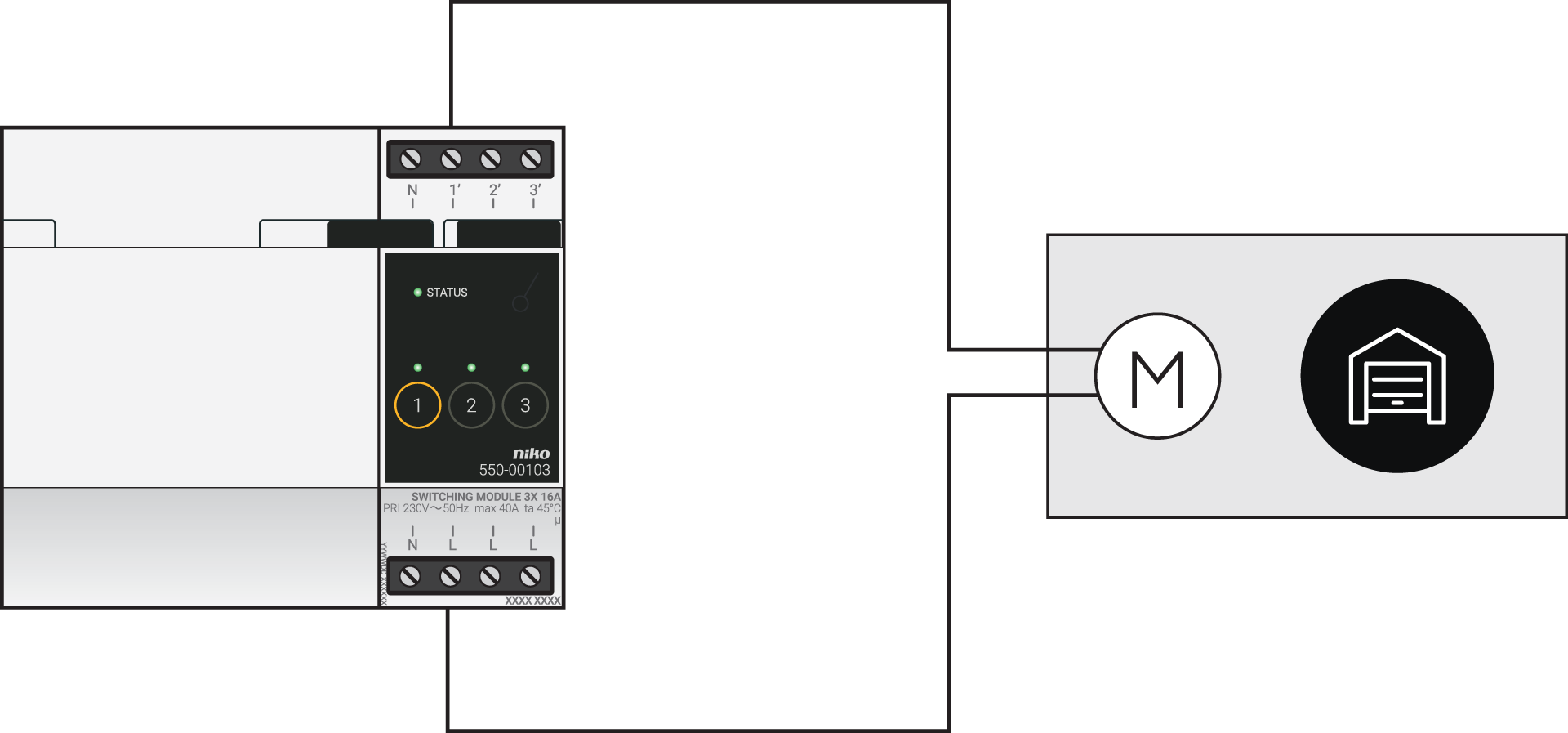
|
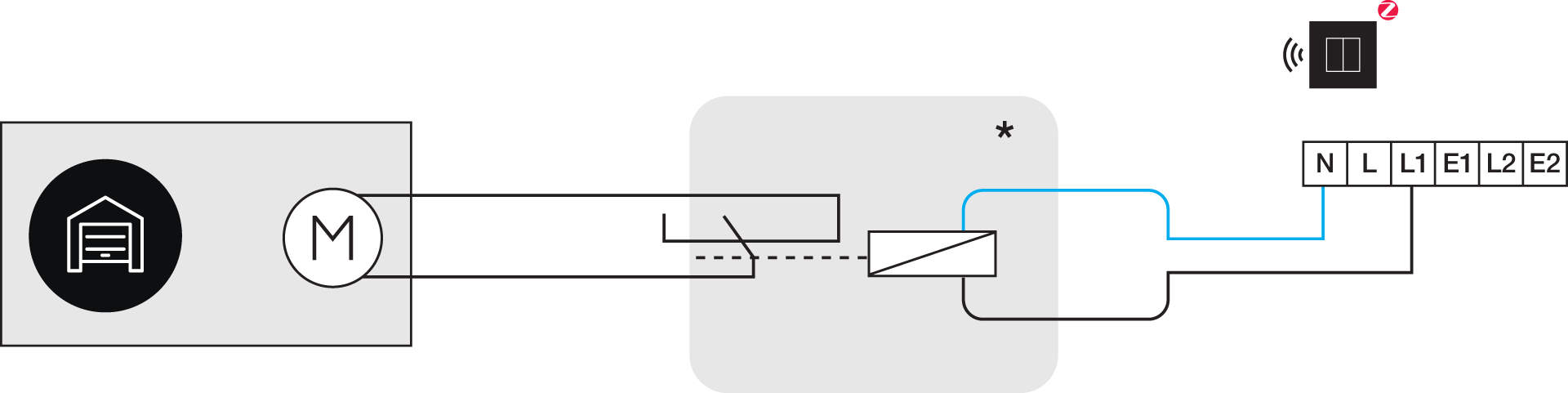
*230 V till potentialfri kontaktmodul (t.ex. Finder 22.32.0.230.1xx0)
|
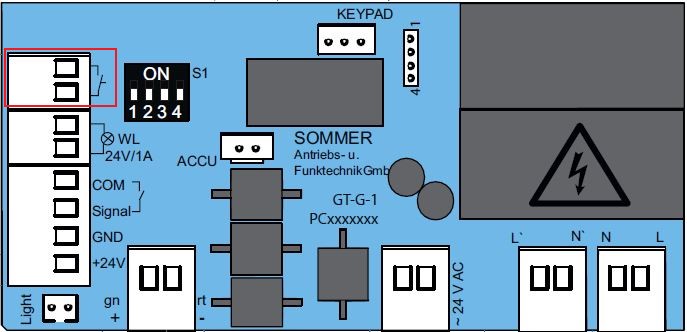
Use the following contacts on the Sommer products:
|
|
Product range |
Contacts |
|---|---|---|
|
Garage doors |
Base and Pro (+) |
|
|
Marathon |
Pin 2 and 3 |
|
|
Tiga |
IN 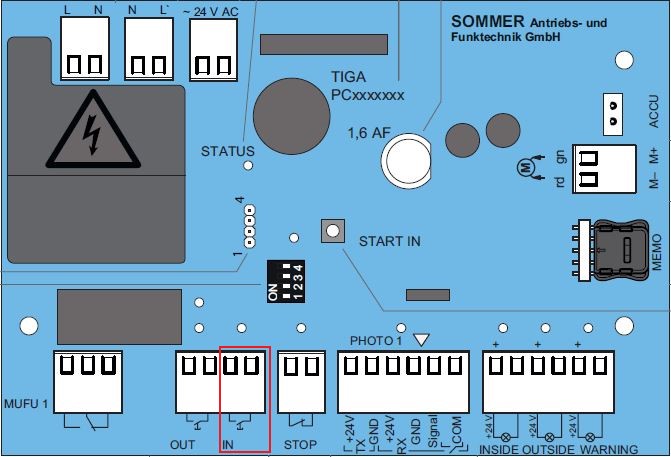
|
|
|
Tiga+ |
IN 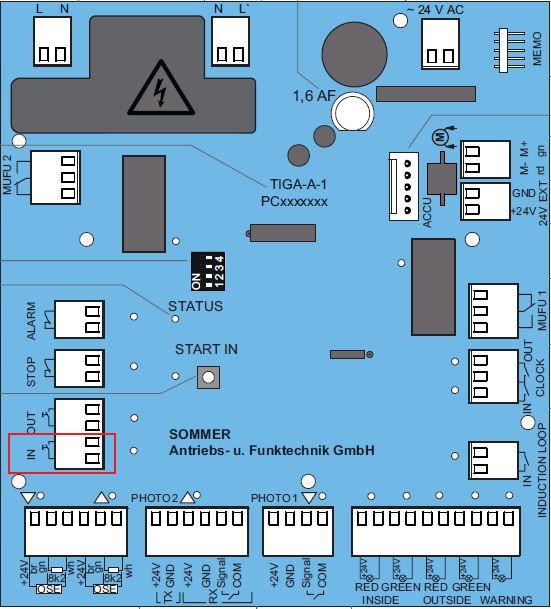
|
|
|
Gates |
Twist 200E(L) |
Impuls (pin 13 and 14) or Gehtür (pin 15 and 16) |
|
Twist AM |
Pin 19, 20, 21, 22, 23, 25 or 27 and Pin 24 (common) |
|
|
Twist 350 (Rapido) (+) |
Pin 21 and 22 or Pin 23 and 24 |
|
|
Twist M(L)(+) |
Impuls (pin 13 and 14) or Gehtür (pin 15 and 16) |
|
|
Twist UG(+) |
START 1 and START 2 |
|
|
Twist XL |
Pin 21 and 22 or Pin 23 and 24 |
Programming
Konfigurera kopplingsaktorn eller den smarta strömställaren i programmeringsprogramvaran. Beroende på vilken typ av installation du har kan du använda följande instruktioner och programmeringsexempel som inspiration:
-
Om du har bussledningar skapar du rutinen ”Åtkomstkontroll för motoriserade dörrar”, se https://guide.niko.eu/en/smnhc2/lv/access-control-for-motorized-doors
-
Om du har en traditionell installation skapar du en puls med en anpassad rutin (definiera start och stopp), se https://guide.niko.eu/en/penhc2/lv/creating-a-pulse-of-less-than-1-second-using-a-pus