Niko Home Control is evolving into MOTIV Building Control. MOTIV is a new brand for intelligent building automation. Built on the trusted foundation of Niko Home Control, MOTIV solutions are designed to make buildings work more naturally for the people inside them. MOTIV helps professionals create smarter, more comfortable buildings. With technology that works quietly in the background. All existing Niko Home Control solutions remain fully compatible with MOTIV. Over time, the full portfolio will move to the MOTIV brand. During this transition, you will see both Niko Home Control (NHC) and MOTIV Building Control (MBC) appear in this documentation. Discover MOTIV at niko.eu/MOTIV
Software Manual
2.28.1 2.27.1 English Danish Dutch French German Slovak Swedish

Zoom

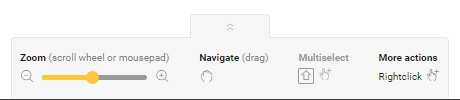
Du finder zoomfunktionen nederst på skærmen i værktøjslinjen. Værktøjslinjen er standard skjult. Klik på pilene for at vise eller skjule værktøjslinjen.
https://s3-eu-west-1.amazonaws.com/guideimages/Screenshots/V2.9/EN/s01_12_00_224_001.png

Brug zoom-funktionen til at zoome ind og ud fra centrum af tegneområdet eller på et specifikt element (i det tilfælde placeres musemarkøren på elementet for at zoomer ind/ud).

Du kan zoome ind og ud på følgende måder:

  • med zoom-linjen nederst på skærmen

  • med rullehjulet på din mus

  • med 2 fingre på en touchpad.

  • Du kan zoome ind op til det dobbelte af den originale størrelse af tegneområdet.

  • Du kan zoome ud, indtil hele tegneområdet er synligt.

  • Du kan også panorere (trække) tegneområdet.

Navigere, vælg multivalg og flere funktioner er kun til orientering.