
What can you do with Sommer and Niko Home Control?
Control your garage doors and gates
If you connect your motor-controlled garage doors and gates to Niko Home Control, you can control them via push buttons, the Niko Home app on a tablet or smartphone, the Touchscreen and/or Digital black.
You can perform the following actions:
-
Open/close
-
Stop opening/closing at an intermediate position
We recommend the following options to make even better use of this connection:
-
Receive an informative notification when the garage door or gate is open while you are away; see Creating notifications.
-
Automatically switch on lighting, when you open the garage door; see custom routine.
What do you need?
Niko requirements
Your Niko Home Control installation meets the following requirements:
-
It has a wireless smart hub or a connected controller II.
-
It is configured with the most recent programming software.
Depending on the basic modules of your Niko Home Control installation, you need to install the following additional products:
|
|
Required additional products |
Reference numbers |
|---|---|---|
|
Connected controller |
Switching module with one free output per signal that you want to use in Niko Home Control If the input contact on your third-party device is not potential-free, you need an additional potential-free contact module (e.g. Finder 22.32.0.230.1xx0 for 230 V connections, Finder 22.32.0.012.1xx0 for 12 V DC connections, Finder 22.32.0.024.1xx0 for 24 V DC connections) |
|
|
Connected controller with a wireless bridge |
Connected (double) switch with one free output (L) per signal that you want to use in Niko Home Control If the input contact on your third-party device is not 230 V, you need an additional 230 V contact module (e.g. Finder 22.32.0.230.1xx0) The connected (double) switch can be placed on a DIN rail using a modular holder (e.g. Legrand 412950) |
|
|
Wireless smart hub |
Connected (double) switch with one free output (L) per signal that you want to use in Niko Home Control If the input contact on your third-party device is not 230 V, you need an additional 230 V contact module (e.g. Finder 22.32.0.230.1xx0) The connected (double) switch can be placed on a DIN rail using a modular holder (e.g. Legrand 412950) |
Sommer requirements
Your system meets the following requirements:
-
It has a potential-free or 12/24 V DC or 230 V AC contact to control the motor.
-
It is compatible with the Niko module (see Niko requirements).
Your system is one of the following Sommer products*:
|
|
Potential-free contacts |
|---|---|
|
Garage doors |
|
|
Gates |
|
*Consult the website of the supplier for detailed specifications and the latest products.
Wiring diagrams
Connecting motors with a potential-free contact
|
Via the switching module |
Via the connected switch |
|---|---|
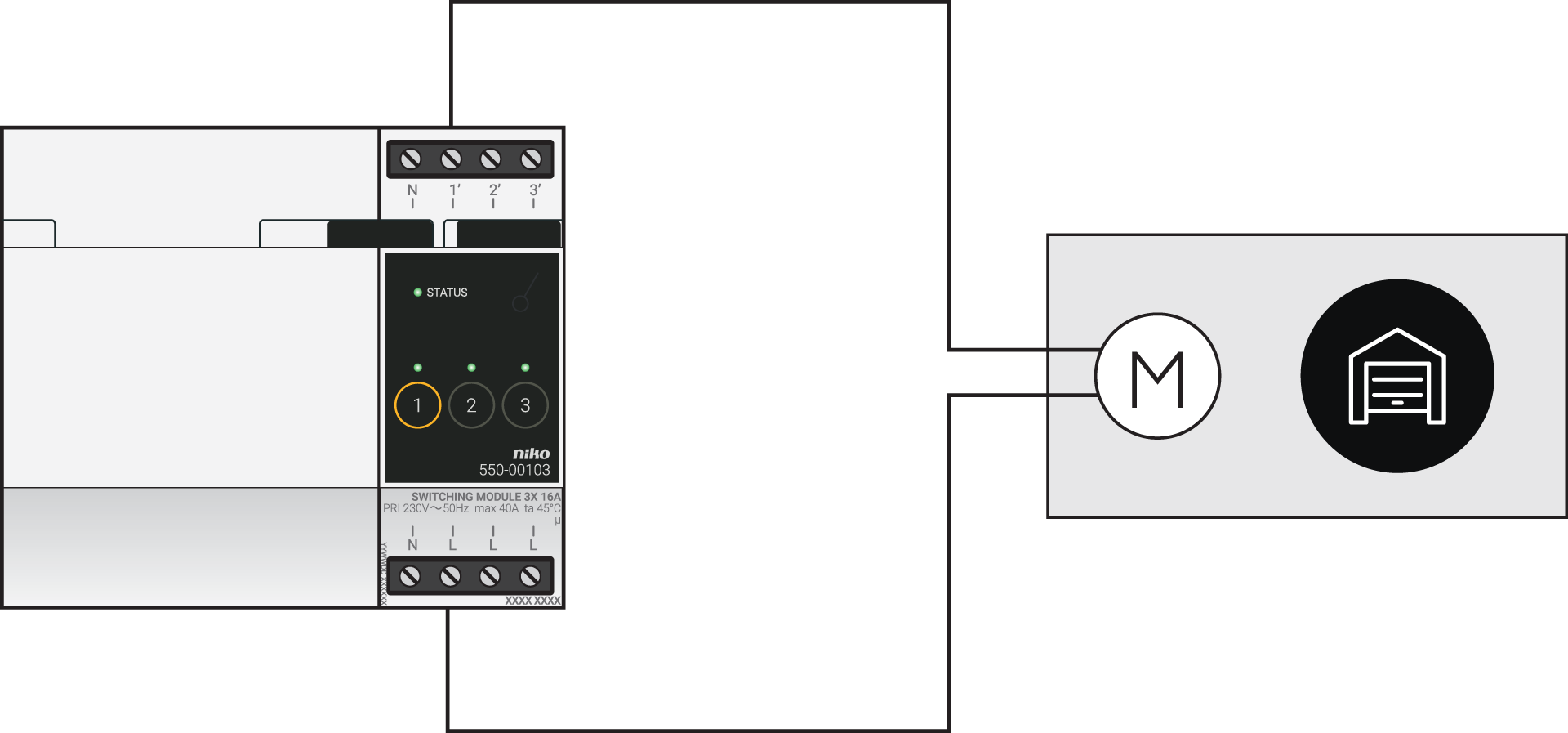
|
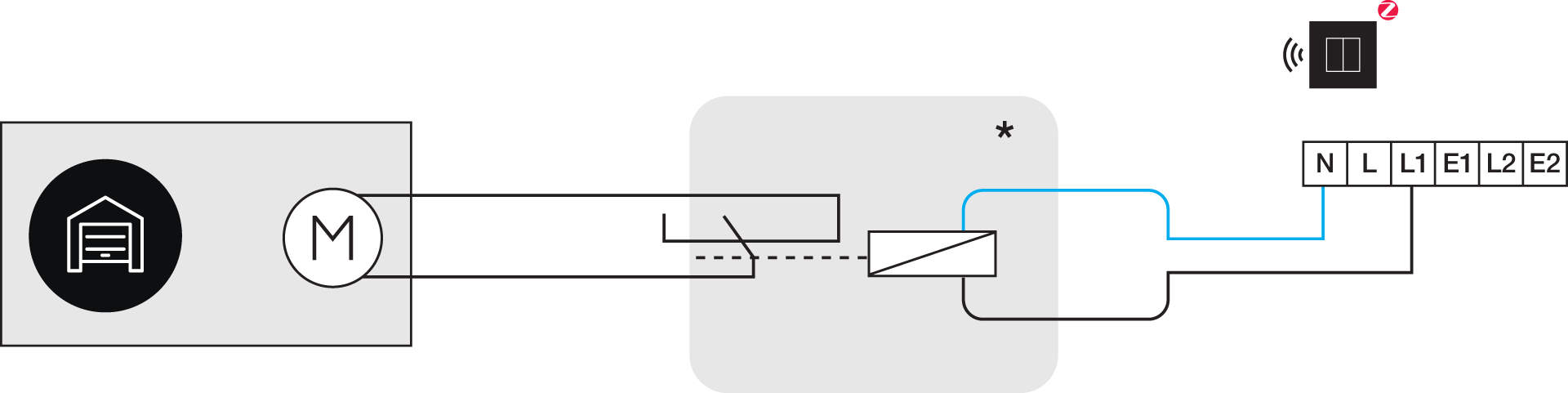
*230 V to potential-free contact module (e.g. Finder 22.32.0.230.1xx0)
|
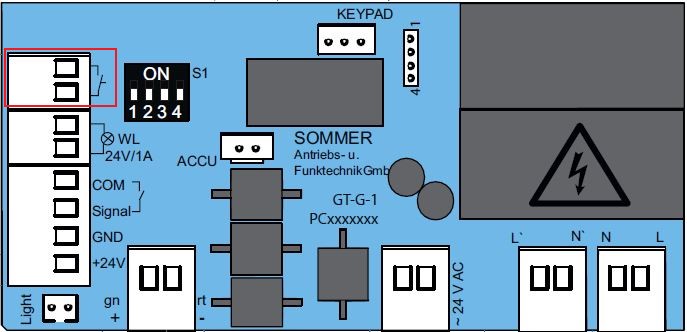
Use the following contacts on the Sommer products:
|
|
Product range |
Contacts |
|---|---|---|
|
Garage doors |
Base and Pro (+) |
|
|
Marathon |
Pin 2 and 3 |
|
|
Tiga |
IN 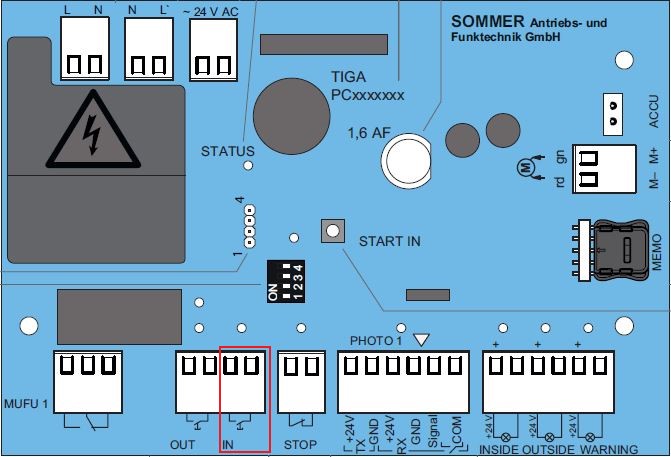
|
|
|
Tiga+ |
IN 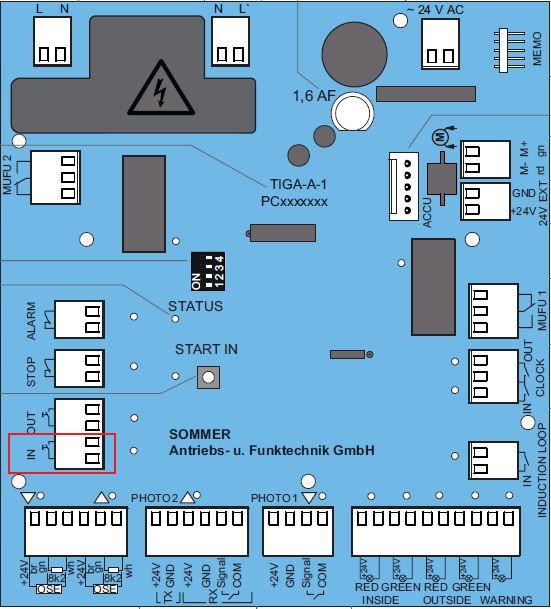
|
|
|
Gates |
Twist 200E(L) |
Impuls (pin 13 and 14) or Gehtür (pin 15 and 16) |
|
Twist AM |
Pin 19, 20, 21, 22, 23, 25 or 27 and Pin 24 (common) |
|
|
Twist 350 (Rapido) (+) |
Pin 21 and 22 or Pin 23 and 24 |
|
|
Twist M(L)(+) |
Impuls (pin 13 and 14) or Gehtür (pin 15 and 16) |
|
|
Twist UG(+) |
START 1 and START 2 |
|
|
Twist XL |
Pin 21 and 22 or Pin 23 and 24 |
Programming
Configure the switching module or connected switch in the programming software. Depending on the type of installation, you can use the following instructions and programming examples as inspiration:
-
In case of bus wiring create a routine ‘Access control for motorised doors’, see https://guide.niko.eu/en/smnhc2/lv/access-control-for-motorized-doors
-
In case of traditional wiring create a pulse using a custom routine (define start and stop), see https://guide.niko.eu/en/penhc2/lv/creating-a-pulse-of-less-than-1-second-using-a-pus