
Description
The MOTIV wireless relay features two normally open switching contacts for controlling 230 V circuits.
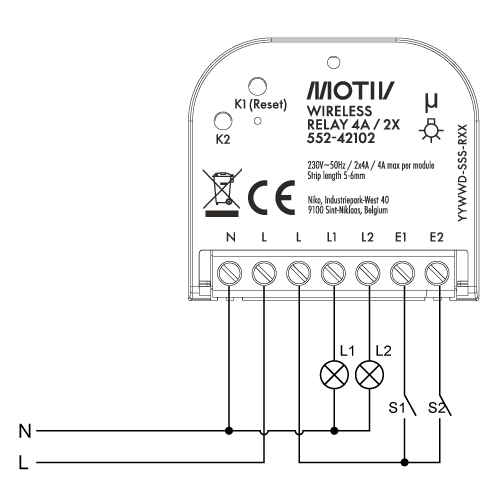
Designed as a direct replacement for conventional switches, the relay offers a flexible solution for both new installations and retrofit projects. Each switching contact is equipped with an extension terminal, allowing seamless integration with a conventional push button. This enables easy implementation of multiway and intermediate switching configurations without additional wiring complexity.
Thanks to its compact design, the MOTIV wireless relay can be discreetly installed behind a blind plate or a push button in the finish and colour of your choice. When used in combination with a push button, installation requires a wall mounting box with a minimum depth of 50 mm.
During the addressing phase, the output will toggle as a confirmation that addressing is completed successfully.
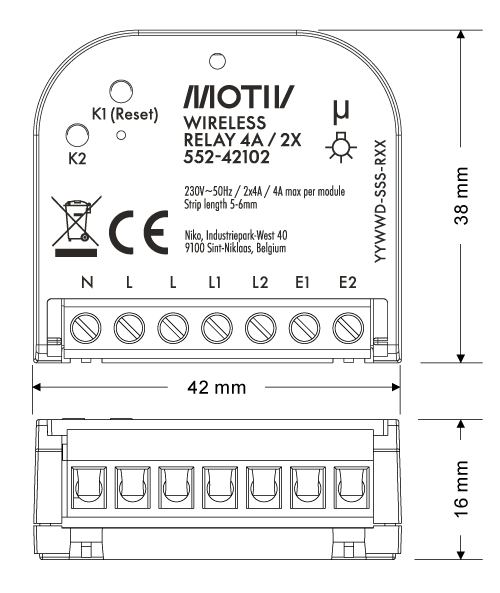
Dimension diagram
Wiring scheme
LED and push-button behaviour
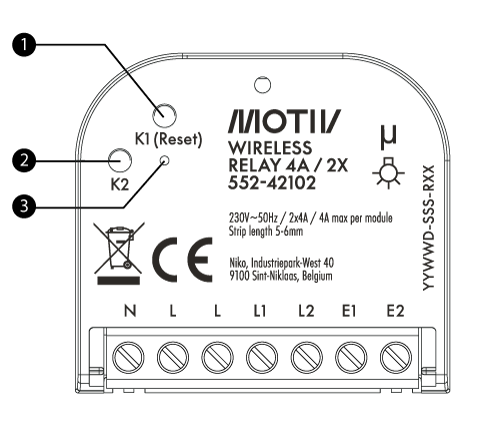
|
Part |
|
|---|---|
|
1 |
K1 (Reset) push-button |
|
2 |
K2 push-button |
|
3 |
LED |
LED behaviour
|
LED behaviour |
Description |
|---|---|
|
Off |
Power off |
|
On |
Standard operation |
|
Flashing |
Pairing mode |
|
Flashing once |
Load switch toggle |
|
Flashing slowly (0,5s interval) |
Overload |
Push-button behaviour
|
Button |
Button press |
Description |
|---|---|---|
|
K1/Reset |
Short press |
Channel 1 load switch on/off |
|
Short press five times |
Factory reset |
|
|
K2/Manual |
Short press |
Channel 2 load switch on/off |
|
S1 |
Short press |
Channel 1 load on/off |
|
S2 |
Short press |
Channel 2 load on/off |