Niko Home Control is evolving into MOTIV Building Control. MOTIV is a new brand for intelligent building automation. Built on the trusted foundation of Niko Home Control, MOTIV solutions are designed to make buildings work more naturally for the people inside them. MOTIV helps professionals create smarter, more comfortable buildings. With technology that works quietly in the background. All existing Niko Home Control solutions remain fully compatible with MOTIV. Over time, the full portfolio will move to the MOTIV brand. During this transition, you will see both Niko Home Control (NHC) and MOTIV Building Control (MBC) appear in this documentation. Discover MOTIV at niko.eu/MOTIV
Software Manual
2.28.1 2.27.1 English Danish Dutch French German Slovak Swedish

Een wekelijks schema aanmaken

Startpunt

Procedure

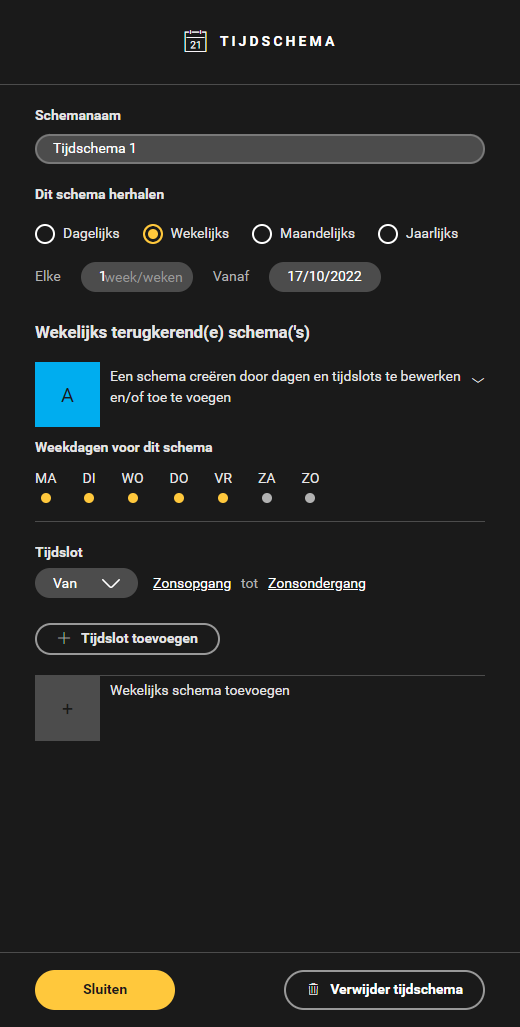
  1. Kies de dagen van de week waarop het tijdschema actief moet zijn. Standaard is dit ingesteld van maandag t.e.m. vrijdag, van zonsopgang tot zonsondergang.
    Resultaat:
    Het keuzerondje van de actieve dagen is geel.
    https://s3-eu-west-1.amazonaws.com/guideimages/Screenshots/V2.9/NL/s11_02_02_216_001.png

  2. Stel een tijdslot in voor de geselecteerde dagen. Kies een tijdslot met vaste tijden of een tijdslot op basis van de astroklok.

  3. (optioneel) Klik op Tijdslot toevoegen om een extra tijdslot aan te maken.

  4. (optioneel) Klik op Wekelijks schema toevoegen om een extra wekelijks schema aan te maken.

  5. Klik op de knop Sluiten om terug te keren naar het overzichtsvenster Creëren.

Voorbeeld

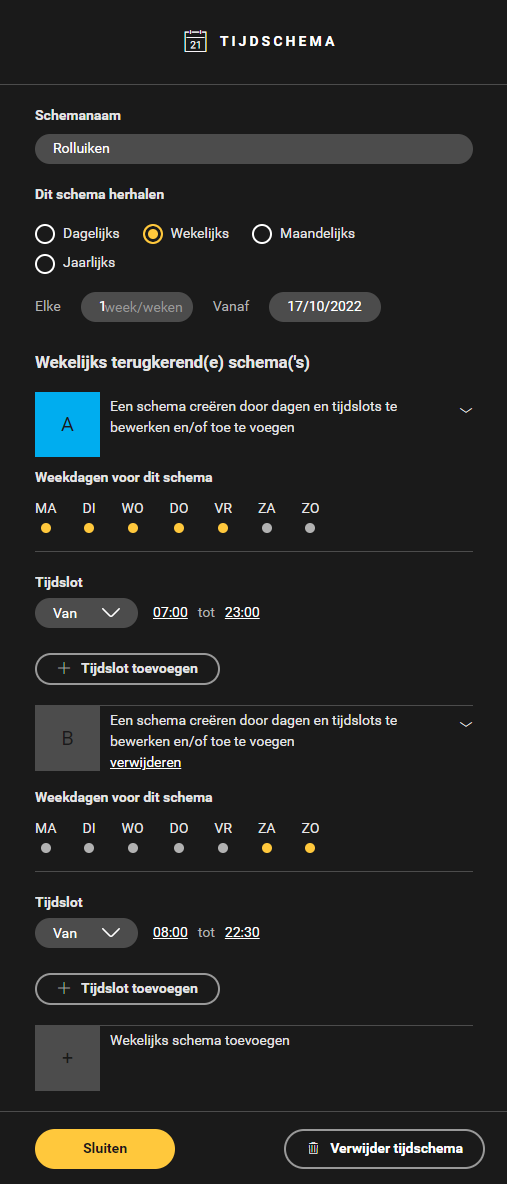
In dit voorbeeld van een tijdschema voor rolluiken zijn de tijdsloten zo ingesteld dat de rolluiken open zijn van 07.00 uur tot 23.00 uur op weekdagen en van 08.00 uur tot 22.30 uur in het weekend.
https://s3-eu-west-1.amazonaws.com/guideimages/Screenshots/V2.9/NL/s11_02_02_216_002.png