Niko Home Control is evolving into MOTIV Building Control. MOTIV is a new brand for intelligent building automation. Built on the trusted foundation of Niko Home Control, MOTIV solutions are designed to make buildings work more naturally for the people inside them. MOTIV helps professionals create smarter, more comfortable buildings. With technology that works quietly in the background. All existing Niko Home Control solutions remain fully compatible with MOTIV. Over time, the full portfolio will move to the MOTIV brand. During this transition, you will see both Niko Home Control (NHC) and MOTIV Building Control (MBC) appear in this documentation. Discover MOTIV at niko.eu/MOTIV
Software Manual
2.28.1 2.27.1 English Danish Dutch French German Slovak Swedish

Zoom

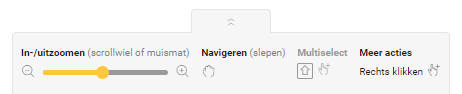
Je vindt de zoomfunctie aan de onderkant van het scherm in de keuzebalk. De keuzebalk is standaard verborgen. Klik op de pijltjes om de keuzebalk te tonen of verbergen.
https://s3-eu-west-1.amazonaws.com/guideimages/Screenshots/V2.9/NL/s01_12_00_224_001.png

Gebruik de zoomfunctie om in en uit te zoomen vanaf het midden van het tekenvlak of op een specifiek element (plaats hiervoor je cursor op dit element en zoom).

Je kunt op één van onderstaande manieren zoomen:

  • met de zoombalk onderaan op het scherm

  • met het bladerwieltje van je muis 

  • met 2 vingers op een touchpad.

  • Je kunt tot maximaal 2 maal de originele tekenvlak grootte inzoomen.

  • Je kunt uitzoomen tot het volledige tekenvlak zichtbaar is.

  • Je kunt het tekenvlak ook pannen (verslepen).

De acties Navigeren, Multiselect en Meer zijn enkel ter informatie.