
Starting point
-
You have an installation with a connected controller.
-
You are on the Overview tab.
Description of the Overview tab
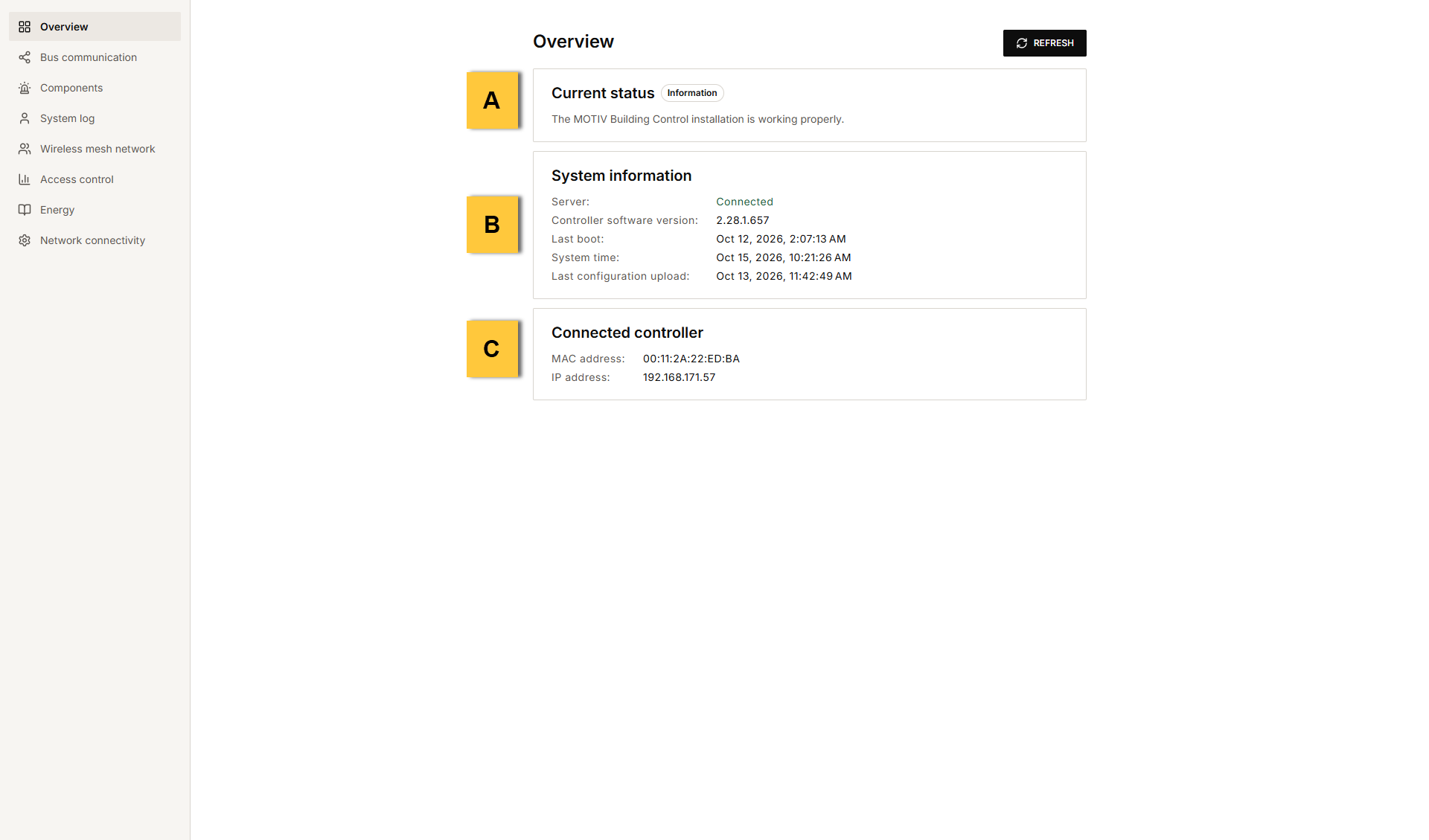
The Overview tab provides a status overview of the installation based on the following components.
|
Ref |
Component |
Description |
|---|---|---|
|
A |
Current status |
Status of the installation |
|
B |
System information |
You will need this information (e.g. the software version, the last configuration upload, …) when you contact Niko customer services. |
|
C |
Connected controller |
You will need this information (MAC address, IP address) when you contact Niko customer services. |
Colour codes for the current server status
|
Colour |
Meaning |
Action |
|
|---|---|---|---|
|
Green |
The connection with the MOTIV server is working properly and the installation has been registered correctly. |
|
|
|
Orange |
The connection with the MOTIV server is working properly, but the installation has not yet been registered. |
Use the MAC address and SN serial number which you can find on the Dashboard page under system information and connected controller. |
|
|
Red |
There is no connection to the Niko server. The internet connection has been interrupted or the Niko server is not accessible. |
Check your internet connection. If it is working well, contact Niko customer services. |
|