
Use of the master detector as a controller
The DALI bridge requires a master detector, which acts as the DALI application controller for the lighting system. It also provides power to the DALI bus. The system cannot operate with only secondary detectors or BMS detectors. Each DALI line must include exactly one master detector.
The master detector executes the lighting application autonomously and continues to control the lighting independently of the DALI bridge or the Building Management System (BMS). It also acts on the sensing event data placed on the bus by the secondary detectors.
Note: The DALI bridge does not generate lighting data itself; it solely acts as a communication gateway between the DALI installation and the BMS.
Use of the secondary detector
To extend the detection area, one or more P46 secondary detectors can be connected to the same DALI bus. The secondary detectors generate sensing event data that is put on the DALI bus.
The maximum number of connected devices depends on the total current consumption of all detectors and DALI drivers on the bus. We recommend reserving at least 20% of the available DALI bus current to accommodate dynamic communication.
The DALI bridge reports a warning to the BMS when the DALI bus current exceeds 80% of its maximum capacity.
Information exchange
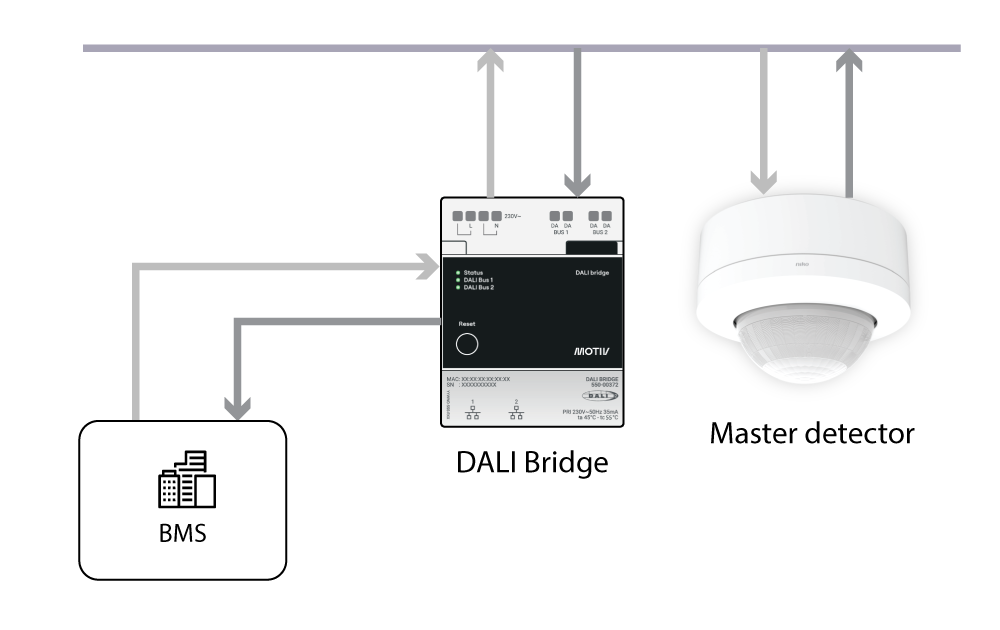
The exchange occurs as follows:
-
When the BMS requests information via Modbus registers, the DALI bridge passes the request on the DALI bus, where it is retrieved by the master detector acting as controller.
-
The master detector responds and puts the requested information on the bus.
-
The DALI bridge retrieves the data from the bus and passes it on to the BMS.
In addition to monitoring and diagnostics, the BMS can write to selected Modbus registers to modify supported settings in the master detector, such as changing lighting behaviour or temporarily forcing the lighting on for a defined period.
Local lighting control
Local lighting control is possible using push buttons, Bluetooth®, or DALI input modules. Users can perform functions such as switching, dimming, scene selection, and colour temperature adjustment.
Commissioning and configuration are performed using the Niko Detector Tool App via Bluetooth®. The app allows installers to configure and adjust the lighting installation during setup and maintenance.