Niko Home Control is evolving into MOTIV Building Control. MOTIV is a new brand for intelligent building automation. Built on the trusted foundation of Niko Home Control, MOTIV solutions are designed to make buildings work more naturally for the people inside them. MOTIV helps professionals create smarter, more comfortable buildings. With technology that works quietly in the background. All existing Niko Home Control solutions remain fully compatible with MOTIV. Over time, the full portfolio will move to the MOTIV brand. During this transition, you will see both Niko Home Control (NHC) and MOTIV Building Control (MBC) appear in this documentation. Discover MOTIV at niko.eu/MOTIV
Programming Examples
English Danish Dutch French German Slovak Swedish

Electrical heating

Use case

Your customer has an electrical heating system with 4 zones. Each zone is equipped with an electrical heating controlled by a thermostat. 

You can also use push buttons with LED(s) and comfort sensors instead of thermostats, or a combination of both.

Procedure

Creating the controls and the devices
  1. Create the thermostats (THT1 and THT2).

  2. Create the electrical heatings (HEAT1 and HEAT2).


https://s3-eu-west-1.amazonaws.com/guideimages/Screenshots/V2.9/EN/SPE_002_213_01.png
Creating the routine

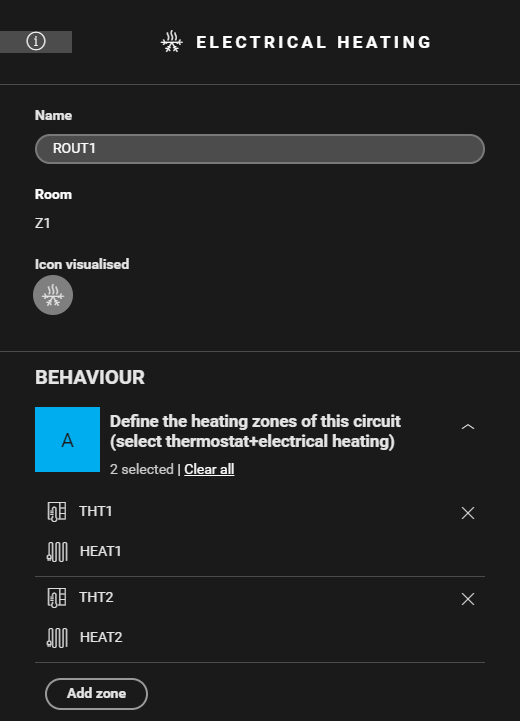
Create a routine Electrical heating (ROUT1). Use the following behaviour, select the electrical heating and corresponding thermostat per zone (THT1 and HEAT1, THT2 and HEAT2).
https://s3-eu-west-1.amazonaws.com/guideimages/Screenshots/V2.9/EN/SPE_002_213_02.png
Filling the cabinet and addressing the devices

Fill the cabinet with ...

and address the following devices ...

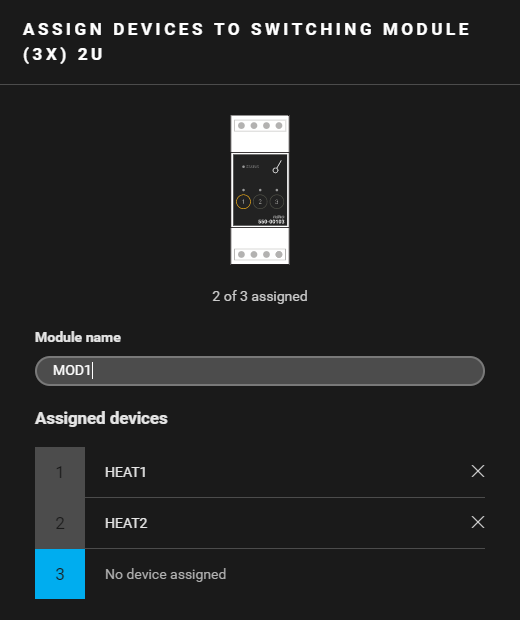
a switching module (3x) 2U (MOD1) (*)

  • the electrical heating HEAT1.

  • the electrical heating HEAT2.

(*) In this example a switching module (550-00103 or 550-00106) is used. You can also use a heating or cooling module (550-00150).


Example

Click here to download the programming example (nhc2 file).