
Prerequisite
Open the Web interface and browse to the SETTINGS page. For more information, refer to Configuring the DALI bridge.
DHCP Setting
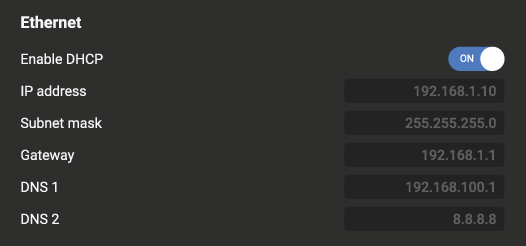
In the Ethernet Settings, on the SETTINGS page, DHCP is enabled by default:
When to keep DHCP on
Turn DHCP ON when the device is connected to a network with a DHCP server (most typical office/home networks with a router). The device will automatically obtain the following:
-
IP address
-
Subnet mask
-
Gateway
-
DNS servers
Use this setting when:
-
You don't need a fixed IP address for the device
-
A router/DHCP server is present on the network
-
You want zero-configuration networking
-
The device may move between networks
When DHCP is ON, the IP fields are shown as read-only (greyed out) and display the currently assigned values.
When to turn DHCP off
Turn DHCP OFF when you need to assign a fixed/static IP address to the device in cases when:
-
The device must always be reachable at the same IP (e.g., for SCADA, BMS, or Modbus TCP integration)
-
No DHCP server is available on the network
-
Network policy requires static addressing
-
You need predictable firewall or routing rules